



Overview
This article outlines the available methods to factory default a Just Add Power 2G Series device.
Warning: Performing a factory default will immediately erase all configuration settings and reboot the device. This action does not prompt for confirmation.
Choosing a Factory Default Method
Use the method that best matches how the device can be accessed:
-
webUI: Use this method when the device is accessible on the network.
-
Telnet: Use this method when command-line access is preferred or the webUI is not accessible.
-
Debug Cable: Use this method when the device cannot be reached over the network.
Factory Default Details
Factory Default Network Settings:
-
IP Mode: Auto IP
-
IP Address: 169.254.x.x /16
-
Default Gateway: None
All other settings revert to model- and firmware-specific defaults.
Factory Default via webUI
-
Log in to the device webUI. For instructions on accessing the device on the network, refer to: How to Access the webUI for 2G Series Devices.
-
Navigate to the following location:
System Tab > Utilities Tab
-
Click the Factory Default button under the Commands section.
-
The device will reboot and return to its factory default state.
Factory Default via Telnet
-
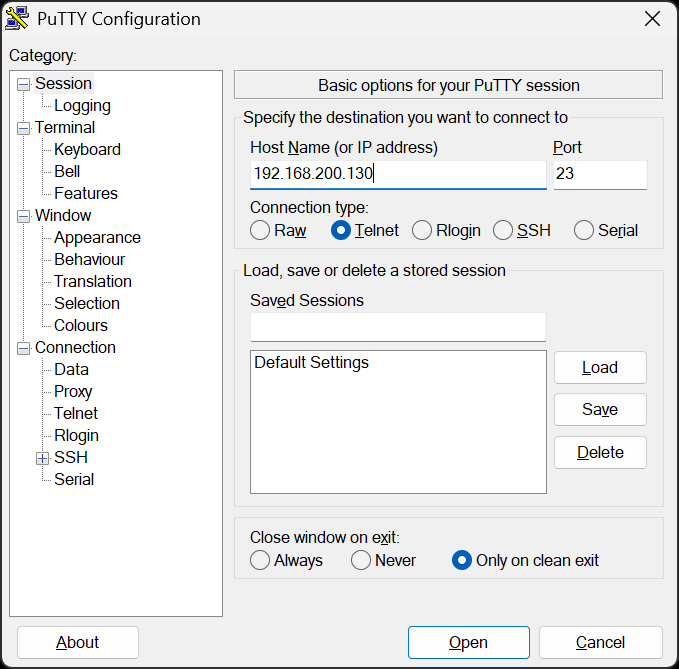
Open a Telnet session to the device (port 23) using a terminal emulator such as PuTTY. For instructions on accessing the device on the network, refer to: How to Access the webUI for 2G Series Devices.
-
At the command prompt
/usr/local/bin/ #, run:reset_to_default.sh
-
Optional (Retain IP):
-
To retain the current IP address while resetting all other settings (if supported by the firmware), run:
reset_to_default.sh -ip
-
-
Reboot the device, run:
reboot -
The device will reboot and return to its factory default state.
Factory Default via Debug Cable
-
Connect a Just Add Power Debug Cable to the device using a USB-to-serial adapter.

-
Open a terminal emulator such as PuTTY with the following settings: 115200, 8-N-1.

-
At the command prompt
/ #, run:reset_to_default.sh
-
Optional (Retain IP):
-
To retain the current IP address while resetting all other settings (if supported by the firmware), run:
reset_to_default.sh -ip
-
-
Reboot the device, run:
reboot -
The device will reboot and return to its factory default state.

